Example
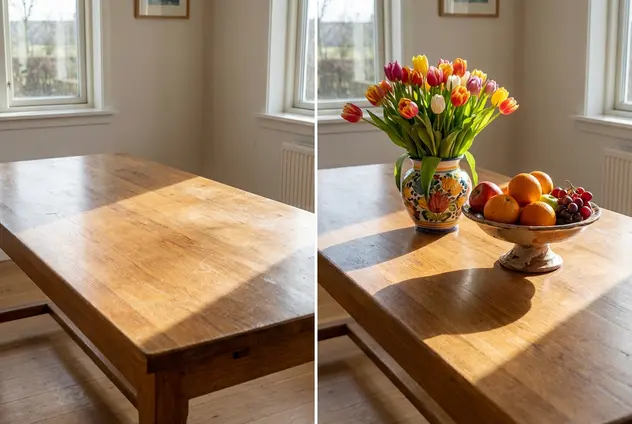
Image Inpainting
Reimagine Your Photos with Generative Fill. Don't just remove—replace and create. Select any part of an image and describe what you want to see to instantly transform your visuals.
How It Works
Use the brush to highlight the specific part of the image you want to change.
Type a text prompt describing the new object or texture you want to generate.
Watch as the AI seamlessly blends your new idea into the original scene.
Save your creatively transformed image in high quality.
What can image inpainting do for you?
Swap & Replace Objects Instantly
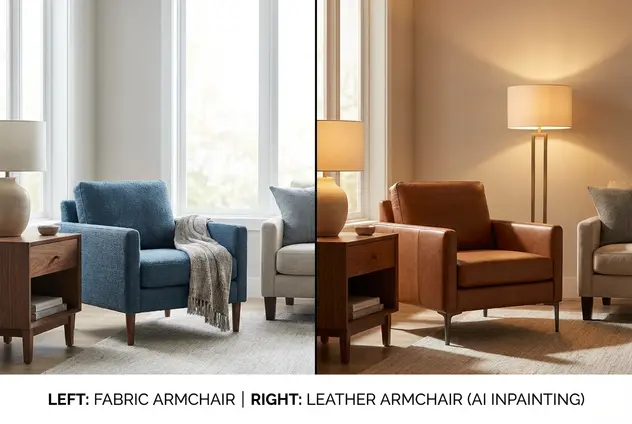
Change the narrative of your photo by swapping existing elements with something entirely new. Want to see how that sofa looks in leather instead of fabric? Or change a coffee cup to a cocktail glass? Simply mask the object and describe the replacement. Our AI analyzes the lighting, perspective, and shadows to ensure the swapped item sits perfectly in the scene, just like a real photo.
Add Creative Elements to Empty Spaces
Turn a plain backdrop into a rich story by adding props and details where there were none. Fill a barren sky with dramatic clouds, place a vase of flowers on an empty table, or add a pet to your family portrait. The generative engine understands depth and context, generating new pixels that interact naturally with the existing environment, making your creative additions indistinguishable from reality.
Modify Outfits & Textures
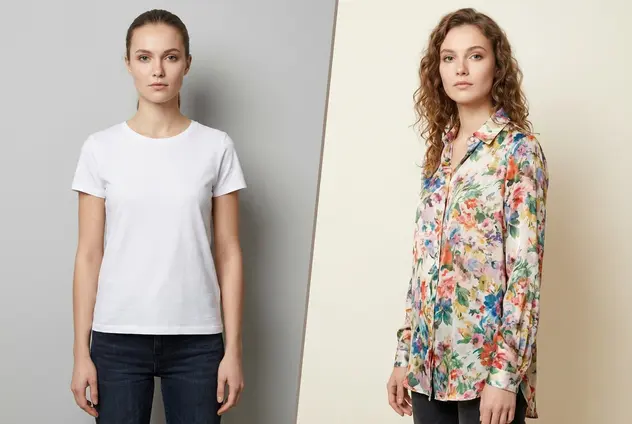
Experiment with style without a reshoot. Mask a model's shirt to change its pattern, texture, or color instantly. Designers and creatives can iterate on looks rapidly—turning a summer dress into a winter coat or changing a billboard's content—all within the original image. This granular control allows for endless variations from a single source photo.